I'm trying to work with an analytics team to have event listeners for a few locations on the site listed here. One of them is for the "Get Started" button in the menu, but I can't seem to find a way to add (or locate) a unique ID for that button. Can you help me understand how to assign a unique ID for that element so we can track that event?
I tried that, though the code I'm trying to use isn't working with CSS classes. Below is the first line of the code where I need the unique ID for the button, hopefully that will help illustrate my question a little better.
I already had a dev try to adjust the code to listen for the CSS class (using the method you suggested below), but they couldn't get it to function using CSS. Can you guide me as to how to add a unique ID to the button specifically? I am not a dev, but I do have devs working with me. If you can direct us as to how to add the unique ID, even if it takes custom code, I believe we could manage.
Never mind, it looks like I was able to come up with a work around for using the CSS class for now. But for the future, I would love to know if there is a way to create a unique ID for something like this.
We actually did try at least something very close to that, and it didn't seem to work, though the snippet that finally seemed to click was similar - it did use const selector. I think (I only know basics of php and javascript, so this was me working with AI to figure this out) that it is, instead of targeting the button element, it is targeting the link... though I could be mistaken in that. You will probably understand more of it than I do. :) But I'll add it below for reference if anyone else is ever looking for something like this. So far it seems to be working, hopefully it will function as expected *fingers crossed*:
(function () { const selector = "(add CSS class given in menu tool here) a"; const conversionId = "(add conversion Id here)";
document.addEventListener("click", function (e) { const link = e.target.closest(selector); if (!link) return;
if (window.saq) { window.saq("conv", conversionId); } }, true); })();
Thank you for sharing that snippet! You're absolutely spot on, your solution works well because it specifically targets the anchor <a> link element within the menu container, which is exactly where the click event happens. Using the "CSS Class" method combined with that script is generally a robust way to handle this in WordPress since menus don't provide a direct "Custom ID" input field for links by default.
To answer your question for the future regarding unique IDs: WordPress actually automatically assigns a unique ID to every single menu item (e.g., menu-item-5479). You can find this by right-clicking your menu button on the frontend and selecting "Inspect". You will see an ID in the code like <li id="menu-item-5479"...>. You can use that auto-generated ID in scripts if you ever need to target a specific button without adding custom classes.
I don't know HOW I missed that, that's what I was looking for, thank you! I think it was because it was buried a little in the element while the other menu options it was listed first. But either way, thank you so much for pointing that out! That is so helpful.
I'm trying to work with an analytics team to have event listeners for a few locations on the site listed here. One of them is for the "Get Started" button in the menu, but I can't seem to find a way to add (or locate) a unique ID for that button. Can you help me understand how to assign a unique ID for that element so we can track that event?
Thank you!
Melanie
Hi Again,
Thanks for reaching out! .
You can only add a Class to the button using the builtin WP options: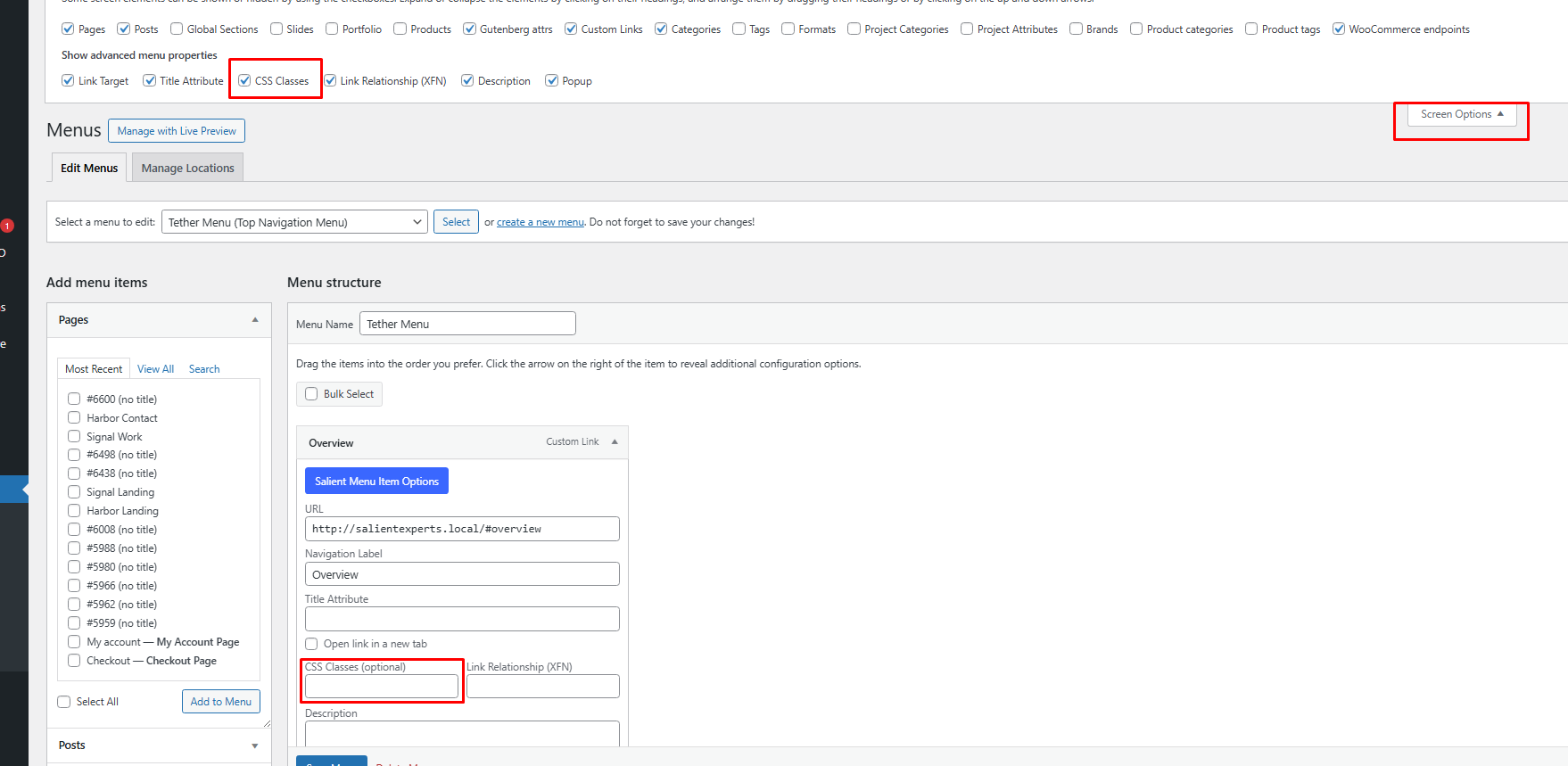
Best,
Salient Support Team
Hi Tahir,
I tried that, though the code I'm trying to use isn't working with CSS classes. Below is the first line of the code where I need the unique ID for the button, hopefully that will help illustrate my question a little better.
I already had a dev try to adjust the code to listen for the CSS class (using the method you suggested below), but they couldn't get it to function using CSS. Can you guide me as to how to add a unique ID to the button specifically? I am not a dev, but I do have devs working with me. If you can direct us as to how to add the unique ID, even if it takes custom code, I believe we could manage.
Analytics Tracking code:
<script> document.getElementById("myButtonID").addEventListener("click",function() ...
Never mind, it looks like I was able to come up with a work around for using the CSS class for now. But for the future, I would love to know if there is a way to create a unique ID for something like this.
Thank you!
Melanie
Hi Again,
Not really sure but if you wish to alter the JS code you can use : https://www.w3schools.com/jsref/met_document_getelementsbyclassname.asp instead of getElementById("myButtonID")
Best,
Salient Support Team
We actually did try at least something very close to that, and it didn't seem to work, though the snippet that finally seemed to click was similar - it did use const selector. I think (I only know basics of php and javascript, so this was me working with AI to figure this out) that it is, instead of targeting the button element, it is targeting the link... though I could be mistaken in that. You will probably understand more of it than I do. :) But I'll add it below for reference if anyone else is ever looking for something like this. So far it seems to be working, hopefully it will function as expected *fingers crossed*:
(function () {
const selector = "(add CSS class given in menu tool here) a";
const conversionId = "(add conversion Id here)";
document.addEventListener("click", function (e) {
const link = e.target.closest(selector);
if (!link) return;
if (window.saq) {
window.saq("conv", conversionId);
}
}, true);
})();
Thanks for your help!
Melanie
Hello Melanie,
Thank you for sharing that snippet! You're absolutely spot on, your solution works well because it specifically targets the anchor <a> link element within the menu container, which is exactly where the click event happens. Using the "CSS Class" method combined with that script is generally a robust way to handle this in WordPress since menus don't provide a direct "Custom ID" input field for links by default.
To answer your question for the future regarding unique IDs: WordPress actually automatically assigns a unique ID to every single menu item (e.g., menu-item-5479). You can find this by right-clicking your menu button on the frontend and selecting "Inspect". You will see an ID in the code like <li id="menu-item-5479"...>. You can use that auto-generated ID in scripts if you ever need to target a specific button without adding custom classes.
Best regards,
Salient Theme Support
I don't know HOW I missed that, that's what I was looking for, thank you! I think it was because it was buried a little in the element while the other menu options it was listed first. But either way, thank you so much for pointing that out! That is so helpful.
Thank you!
Melanie
Hello Melanie,
I'm glad to hear that helped! It is definitely easy to miss those IDs since they are tucked away inside the HTML markup.
You are very welcome, and please feel free to reach out if you need anything else in the future.
Best regards,
Salient Theme Support