I am using the Off Canvas Menu of the theme. When clicking on a partiular Menu Items, the drop down menu flies in and on top it give you a "Back" option.
My questions:
a. Can I change the animation of the appareance of the drop down menu (from flying in to fading in)?
b. Can I change the word "Back" to something else?
To answer your questions: a. Can I change the animation of the appearance of the drop down menu (from flying in to fading in)?
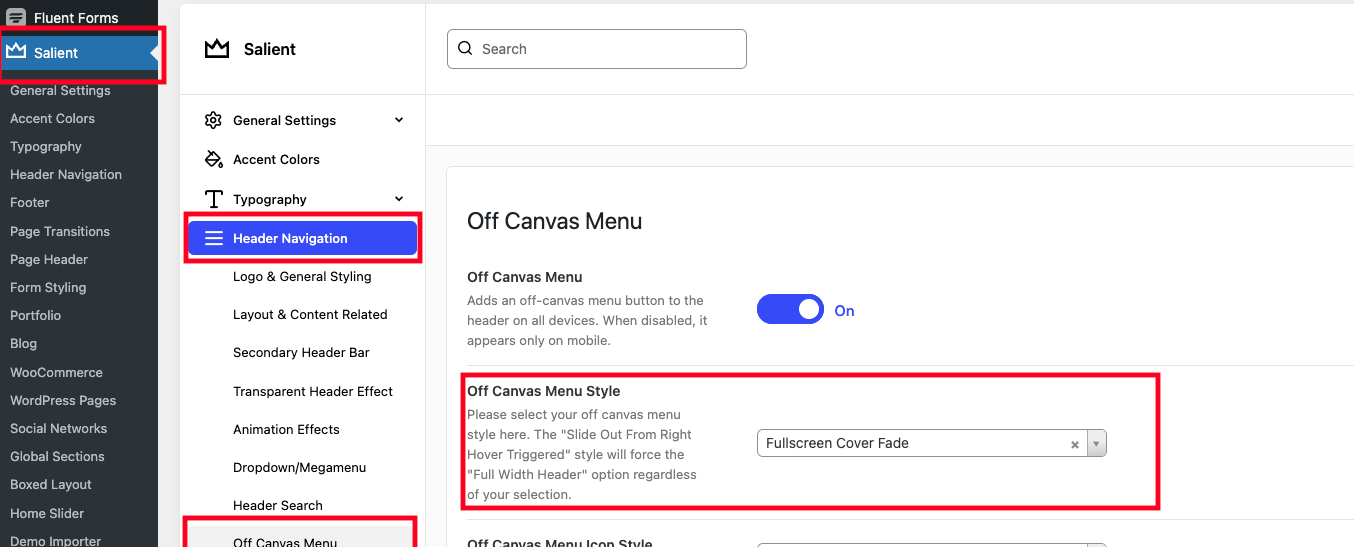
On this, I'm not sure what you mean by this but all the style settings are under Salient > Header Navigation > Off Canvas Menu then try out the available options in the "Off Canvas Menu Style". I suspect "Fullscreen Cover Slide + Blur BG" to be likely the effect you're describing:
b. Can I change the word "Back" to something else?
I'm happy that I could assist you! If you haven't already, please consider sharing your experience by leaving a review on ThemeForest. Your feedback is valuable to us and greatly appreciated!
I am using the Off Canvas Menu of the theme. When clicking on a partiular Menu Items, the drop down menu flies in and on top it give you a "Back" option.
My questions:
a. Can I change the animation of the appareance of the drop down menu (from flying in to fading in)?
b. Can I change the word "Back" to something else?
Attached files: Bildschirmfoto 2026-01-06 um 16.20.38.png
Hello there,
Thanks for writing in, I trust you're doing well!
To answer your questions:
a. Can I change the animation of the appearance of the drop down menu (from flying in to fading in)?
On this, I'm not sure what you mean by this but all the style settings are under Salient > Header Navigation > Off Canvas Menu then try out the available options in the "Off Canvas Menu Style". I suspect "Fullscreen Cover Slide + Blur BG" to be likely the effect you're describing:
b. Can I change the word "Back" to something else?
Since this is a theme string, you can make use of a translation plugin like "Say What?" to change it: https://themenectar.com/docs/salient/translations/#:~:text=Translating%20a%20few%20items
Please give it a try and let us know how it goes!
Best wishes,
Salient Theme Support
Hey Pat,
thanks for the great support and in particular pointing me to "Say What". Works perfectly.
Hello,
Great to have you back!
I'm happy that I could assist you! If you haven't already, please consider sharing your experience by leaving a review on ThemeForest. Your feedback is valuable to us and greatly appreciated!
Kind regards,
Salient Theme Support